
Using AI to Simulate Early-Stage User Research
Before you talk to a single user, AI can help you form hypotheses, map likely pain points and write better interview questions. Here's how to do it without fooling yourself.
The hardest part of early-stage research is often the very beginning. You have an idea, a rough sense of who it's for, and a blank document titled "Research plan". Where do you start?
AI is surprisingly useful here — not as a replacement for users, but as a thinking partner that helps you walk into real research better prepared.
Why simulate before you research?
Good research starts with good questions. If you go into interviews with vague questions, you get vague answers. Simulation helps you:
- turn assumptions into testable hypotheses
- anticipate pain points worth probing
- write sharper interview questions
- notice perspectives you hadn't considered
It's rehearsal, not the performance.
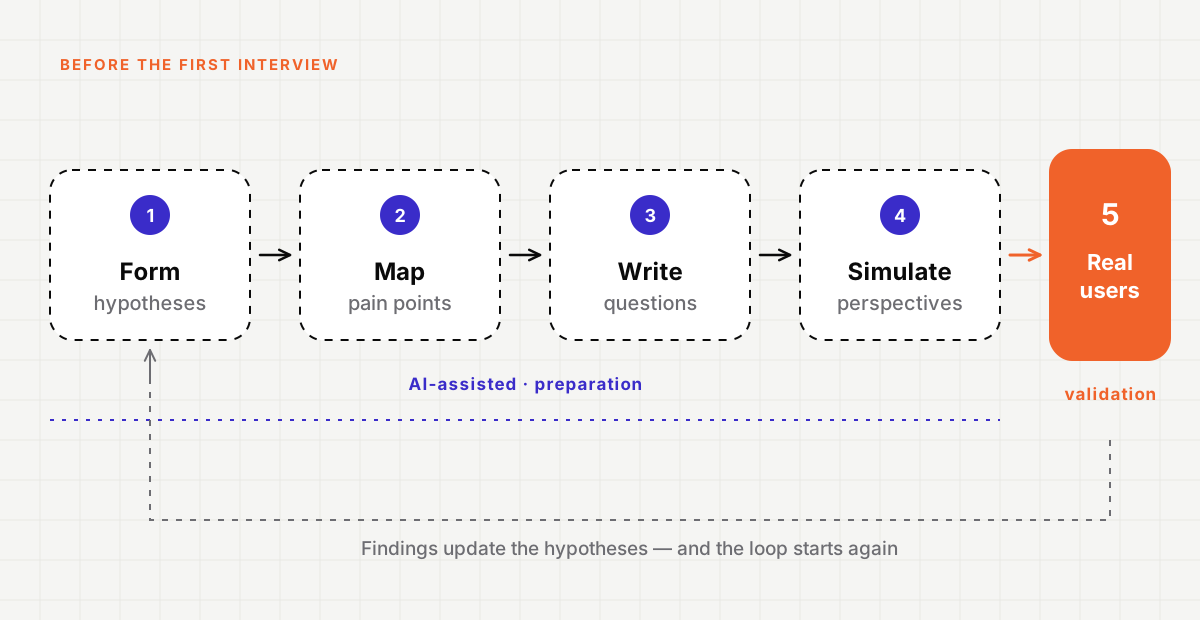
Step 1: Turn assumptions into hypotheses
Start by writing down everything you believe about your users and their problem. Then ask AI to help you turn each belief into a hypothesis you could prove wrong.
For example:
- Assumption: "Small business owners hate invoicing."
- Hypothesis: "Small business owners with fewer than ten clients spend more time chasing late payments than creating invoices."
The second version is specific enough to test. AI is good at pushing vague statements toward testable ones — and at pointing out which assumptions are doing the most work in your plan.
Step 2: Map potential pain points
Describe your target user and their context, then ask AI to list the problems they might face across a typical day or workflow. Ask it to separate obvious problems from less obvious ones.
Treat this list as a map of places to look, not a list of findings. Some items will be wrong. Some will be right but unimportant. The point is to avoid missing a whole area entirely.
Step 3: Write better interview questions
This is where AI earns its place. Give it your hypotheses and ask for open, non-leading interview questions. Then ask it to review your own questions and flag any that are leading, double-barrelled or likely to get a yes/no answer.
Before and after
- ❌ "Would you use a tool that automated your invoices?"
- ✅ "Tell me about the last time you sent an invoice. What happened next?"
The first invites a polite yes. The second invites a story — and stories are where the insight is.
Step 4: Simulate different perspectives
You can ask AI to respond as different kinds of users: a first-time user, a sceptical manager, someone with a screen reader, someone on a slow connection. Run your interview guide against these simulated perspectives and see where your questions break down or where you've made assumptions.
Simulated users are useful for testing your questions. They are not useful for answering them.
This is the step where teams most often fool themselves. A simulated persona will always give a fluent, plausible answer. That fluency can feel like evidence. It isn't. It's a reflection of patterns in the model's training data, not the lived experience of your actual users.
Step 5: Validate with real people
Everything before this step is preparation. Now go and talk to real users. Use the hypotheses, the pain-point map and the improved interview guide — and be ready for them to be wrong.
In fact, the most valuable outcome of early research is often discovering which of your confident hypotheses didn't survive contact with reality.
What this looks like in practice
A lightweight version we use:
- One hour with AI turning assumptions into hypotheses and mapping pain points.
- One hour drafting and stress-testing the interview guide against simulated perspectives.
- Five to eight real interviews using the refined guide.
- A clear split in the final write-up between what was assumed and what was observed.
The takeaway
AI won't tell you what your users need. But it can make sure you arrive at your first interview with better questions, fewer blind spots and a clearer idea of what you're trying to learn. That's a very good use of a couple of hours.